SpaceOS on the spacecraft
SpaceOS runs on the payload side of the spacecraft. It does not fly the vehicle. The flight computer remains in charge and continues running if the payload computer fails.
Flight OS, container platform, and SpaceOS
SpaceOS handles payload middleware. A flight OS and a general-purpose container platform each solve a different problem, and this table sets the three side by side. Space engineers call the part of a satellite that keeps it alive (attitude, power, thermal) the platform, or the bus; this page says platform, and keeps spacecraft bus for the data bus, the wire that carries frames between on-board computers.
| Flight OS | Container platform | SpaceOS | |
|---|---|---|---|
| Examples | VxWorks, RTEMS, PikeOS | Docker or K3s on Linux, Yocto plus containers | OCI containers and MirageOS or Unikraft unikernels, on a Linux control plane |
| Job | The platform: attitude and orbit control, power, thermal, instrument timing | General-purpose application deployment on Linux | Payload middleware: deploying, isolating, and supervising mission applications |
| Real-time | Hard real-time scheduling | None | None |
| Isolation | ARINC 653 partitioning, separation kernel | Linux namespaces, one kernel for every tenant | One machine per tenant, so tenants share no kernel; a unikernel gets a VM of its own |
| Footprint | Minimal, bare-metal or RTOS image | Hundreds of MB | A container's image size, or a unikernel image holding only the libraries it links |
| Updates | Full image replacement, infrequent | Registry pull | Signed OCI content over CCSDS links, health-gated with automatic fallback |
| Written by | Embedded specialists in C or Ada | Application developers using container tooling | Application developers in OCaml, C, C++, Python, or Rust |
The flight OS column names three standards and products. ARINC 653 is the avionics standard for a partitioned real-time operating system, which gives each partition a fixed share of memory and fixed time slots. VxWorks and RTEMS are real-time operating systems, and PikeOS is a separation kernel. The container column names K3s, a small Kubernetes distribution that runs containers across machines, and Yocto, a toolkit for building a custom embedded Linux distribution. SpaceOS runs its workloads on a Linux control plane: the SpaceOS services on the node that admit, start, and supervise workloads, which Platform architecture lists.
SpaceOS keeps the Docker workflow: build an image, push it to a registry, deploy it to a target. VxWorks or PikeOS runs the platform, and SpaceOS runs on the payload computer, handling the software lifecycle for work that has no control-loop deadline.
Software domains
A spacecraft running SpaceOS has two software domains:
- The flight domain controls attitude, propulsion, power, and spacecraft commands. It usually runs a real-time operating system (RTOS) with a flight-software framework such as JPL's F-Prime or NASA's cFS. It has its own boot and its own fault detection, isolation, and recovery (FDIR). It also has a hardware watchdog, a timer that resets the computer if software stops refreshing it.
- The payload domain runs SpaceOS on a payload or mission computer. SpaceOS checks and starts isolated workloads. It also handles payload data sent to and from ground.
The flight computer boots and recovers without SpaceOS. SpaceOS may read telemetry and relay a signed command, but it cannot restart the flight computer or refresh its watchdog.
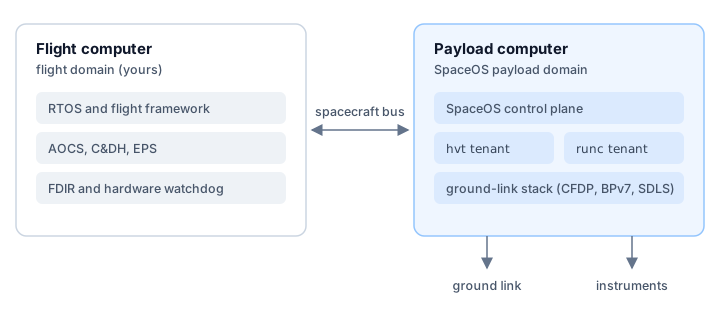
The flight computer runs the RTOS, flight framework, control functions, FDIR,
and watchdog. The payload computer runs the SpaceOS control plane and isolated
workloads, each unikernel in a virtual machine of its own (hvt) and each
Linux service in a container (runc) inside its tenant's machine. A spacecraft bus carries frames between the two domains. Each frame
is tagged with an APID, the CCSDS number that
says which stream it belongs to. The payload computer connects separately to
the ground link and to any bulk-data instrument links.
The domains may run on separate computers. They may also share hardware under a separation kernel or a flight-owned hypervisor. The flight computer keeps the same control in every layout.
Inspect the spacecraft boundary
Start with the target record. Connecting the node stores its profile, orbit,
ground route, and signing custody; space target show reads that record back:
$ space target connect sat-42 --profile cm5-dev \> --endpoint ipn:7.1 --cla-address sat-42.example:4556 \> --tle sat-42.tle --station 37.619,-122.375,0.004✓ sat-42 registered: cm5-dev, orbit$ space target show sat-42name : sat-42profile : cm5-dev@sha256:9a763f58b419708a33ba38e540d0d3b3ca9fba99846863daed4636c97bf55145board : raspberrypi-cm5signing-key : /tmp/space-docs/config/keys/target-sat-42-boot.pemdtb : (firmware stock)kernel : (image default)ack-key : /tmp/space-docs/config/keys/target-sat-42-ack.pemrecipient-key: (none: whole-bundle delivery only)runtime-provenance: (none: releases measured against this ground's own ceiling)approves : you, aloneendpoint : ipn:7.1cla-address : sat-42.example:4556contact : derived from sat-42.tle over 37.619,-122.375,0.004rate : 1e+06 B/s (default)ground : this machine's local groundpublisher (none: a deploy pins this machine's signing identity once a build's evidence verifies under it)verdict no verdict recorded: this machine keeps no deploy store yet (/tmp/space-docs/config/deploys.sqlite), where the ground `space up` runs would record what sat-42 announcesThe provider was not asked: no target file for sat-42 is recorded on this machine, and this directory holds no targets/sat-42.yaml. Name the directory that holds the file, `space target show PATH`, or record it once with `space target connect PATH`The record names the keys the target holds and the link rate a deploy is timed
against.
Inspect the integration model
explains each field. The last line is not an error: it says the command did
not query a cloud provider, because this directory holds no targets/sat-42.yaml
describing provider resources.
Resolve the release without sending it:
space deploy payload:release --target sat-42 --planCheck which telemetry IDs the payload may use and where its messages may go. The plan also shows what resets the payload computer and which key approves its boot image. Then deploy and watch the result:
space deploy payload:release --target sat-42space show sat-42 v1space show reports when the files arrive, when the node installs them, and
when the new software passes its health checks. File delivery alone does not
mean that the software is running.
Link responsibilities
- The spacecraft bus carries fixed-size, APID-tagged frames in both directions: flight telemetry, events, and parameters flowing to payload and ground; authorized commands flowing back. An isolated bus adapter owns the physical device. It enforces direction and frame bounds, and it fails closed on malformed traffic. Applications reach the bus through the adapter.
- The flight computer checks every command. Each command names its target and action. It also carries limits, a sequence number, an expiration, and a signature. SpaceOS relays the command. The flight computer checks it before acting and reports the result in telemetry.
- The radio belongs to whichever domain the integration gives it. SpaceOS frames the downlink itself when it runs as a system image, running CFDP over BPv7/BPSec end to end and SDLS per hop. In a daemon install it can hand the framed stream to your flight software for transmission.
- High-throughput instrument data uses its own bulk link, granted separately from the command path. That link runs over a spacecraft-grade serial fabric such as SpaceWire or SpaceFibre.
FDIR ownership
SpaceOS handles each failure at the smallest boundary that contains it, and its responses never reach into the flight domain. An SEU is a single-event upset, a bit flipped by ionizing radiation.
| Failure | Detected by | Response | Contained to |
|---|---|---|---|
| Service crashes or fails its healthcheck | The runner's probe | Isolate, back off, relaunch that service | One service |
| Guest wedges (alive but silent) | Heartbeat stall on the supervision page: no advance for 5 seconds | Restart that partition | One partition |
| SEU corrupts stored payload data | Verified reads (dm-verity) on the read-only root; CRC-32 on partition records | Read fails; the affected partition restarts | One partition |
| SEU corrupts payload memory in use | Your platform's memory error reporting, where the payload computer has it | Whatever that reporting drives; SpaceOS adds no detection of its own | Not bounded by SpaceOS |
| Payload control plane faults | space-init's internal FDIR | Payload safe mode: the payload stops, the node stays up and reachable | The payload computer |
| Payload computer hangs | Hardware watchdog on the payload node | Reset; boot falls back to the last healthy release | The payload computer |
| Flight domain faults | Your FDIR and your watchdog | Your recovery, untouched by any of the above | Your domain |
Read the two SEU rows as a boundary. dm-verity hashes blocks read from the read-only root. The superblock, each parameter entry, and each data-product descriptor on a partition's block device end in a CRC-32 that the reader checks. An upset that corrupts either is caught on the next read. Neither sees a bit flip in a running process's heap, in a page table, or in a register. Detecting those needs memory error reporting from the payload computer, so the mission owns that choice: an ECC part reports and corrects, and a part without ECC cannot tell you an upset happened. Pick the hardware for the orbit and the mission life you are flying.
Payload-domain failures stay in the payload domain. A dead payload computer cannot reset flight, refresh its watchdog, suppress its FDIR, or claim a more privileged command channel. When the bus is congested, the adapter may drop payload telemetry. Payload traffic never blocks a control loop.
Payload safe mode
Safe mode is the response to a fault in the payload control plane. The payload stops. The node stays powered and reachable.
| Component | In safe mode |
|---|---|
| Payload workloads | Stopped |
| Network switch and uplink | Running |
| Deploy receiver | Running |
| Runner | Running |
| Log and metric collectors | Running |
The node does not power off. A powered-off payload computer answers no uplink, so the fault that triggered safe mode would stay uncorrected until the next opportunity to power-cycle the hardware. Keeping the link and the deploy receiver running means you can uplink a recovery release to a node that is already in safe mode, and the collectors are how you see the node entered it.
space-init's FDIR watches the control plane's own isolation. At boot it
takes a baseline: the SHA-256 digests of three views of its own process,
read from /proc/self, namely its memory map, its seccomp and capability
state, and its cgroup membership. Every 30 seconds it reads them again and
compares. One digest that differs is logged, two degrade the node, and more
enter safe mode.
To leave safe mode, apply a release or reboot the node. There is no separate exit command. The baseline is taken once per boot, so a reboot, or a system release that boots the node, starts FDIR from a fresh one.
One condition does power the node off, and it is not safe mode: a one-shot node
powers off after every workload runs to completion. A one-shot node is one
whose image was assembled for no target (space build without --target). An
image assembled with --target for a deploy target keeps serving the control
plane after its workloads finish.
A critical control-plane daemon that crash-loops past its restart bound does not power the node off either. The node stays up degraded, with the uplink and the deploy receiver still running, because a powered-off node is a node no recovery release can reach. Rolling back is the operator's decision, taken over a link that is still there.
The payload watchdog
space-init arms the watchdog on a board that exposes one, once the node
reaches its serving state. A board with a watchdog device is armed whatever its
target profile says.
A target profile states whether it depends on the watchdog. The profile's
kernel command line carries the claim as the space.watchdog parameter, which
takes one of two values:
| Value | Node with a watchdog device | Node with no watchdog device |
|---|---|---|
none | Arms the device. | Boots, prints No payload watchdog; node runs unwatched, and starts its workloads. |
required | Arms the device. | Boots, prints WATCHDOG: space.watchdog=required claims the payload watchdog, and this node has none, and starts no workload. |
A command line without the parameter means none. A value other than none
or required starts no workload either, so a misspelled claim never drops the
guarantee. Under
required, a device whose timeout space-init cannot reconcile is refused
the same way. The node stays up after a refusal so you can read its console.
None of the profiles in Supported targets claims
the watchdog, so each one runs unwatched on a machine with no device. A
development VM under macos-vmm is that case. A project profile under
profiles/ that adds space.watchdog=required to its command line makes a
board without a watchdog refuse its workloads.
The refresh is conditional on the runner replying. space-init refreshes the
device only when the runner answers a request on its control socket. A watchdog
refreshed on a timer alone catches a stopped kernel and misses a wedged control
plane, because the timer keeps firing after the runner stops answering. Tying
the refresh to a reply the runner has to produce covers that case.
When the runner stops answering, space-init stops refreshing and the hardware
resets the node. space-init does not reset the node itself: a wedged control
plane cannot be relied on to run a shutdown path. After the reset, the boot
decision finds the trial unconfirmed and falls back to the last healthy release.
The default is a refresh every 15 seconds against a 60 second timeout. After a
refresh at time 0, the device resets the node at 60 seconds unless another
refresh arrives first. The refreshes due at 15, 30, and 45 seconds can all be
missed; the node resets only when the one due at 60 seconds misses too. Set the device timeout on the
kernel command line for your board. space-init reads the effective timeout
back from the driver and refreshes against that value. A device timeout T under 30 seconds
would leave fewer than two refreshes inside it, so space-init then refreshes
every T/2 seconds.
Know what SpaceOS can control
- It makes no hard-real-time guarantee and schedules no fixed time windows; anything with a control-loop deadline stays in your domain.
- It cannot originate flight commands. It relays signed objects that your domain verifies for itself.
- Its workloads run inside fixed resource envelopes set at deployment: memory per partition and CPUs per service. A runaway payload job starves inside its own envelope and leaves the bus alone.
- Workload and system updates apply only to the payload computer. They are health-gated with automatic fallback, and they survive a power loss at any point.
Integration inputs
Integration needs four inputs:
- The bus binding. Select the physical transport and the frame budget. MIL-STD-1553 is a 1 Mbit/s command-response avionics bus, CAN is a multi-master bus from the automotive world at up to 1 Mbit/s, serial is a point-to-point UART line, and SpaceWire (ECSS-E-ST-50-12C) is a point-to-point link at up to hundreds of Mbit/s between instruments and computers; the payload-side protocol is the same fixed-size message format in every topology.
- The APID plan. Declare which telemetry your domain publishes and
which command streams it accepts.
space-netknows which service sent a frame by the Unix socket it arrived on, one socket per service; it uses the APID only to check that it lies in that service's declared range and to sort streams, never to decide who sent the frame. - The command authority. Pin the public keys whose signed commands your domain will accept. Key custody stays with you, under the same contact-window constraints that shape the platform's own key handling.
- The simulator, if you want one. A flight simulator attaches as a bus peer at deploy time. It speaks the same interfaces as the real flight node, and the release provenance records that a simulator stood in for it. Tests run against the simulator therefore exercise the interfaces flight will use.
Fault-injection tests qualify a physical bus binding. They cover malformed traffic, a saturated payload, an adapter crash, cable loss, and stale or duplicated commands, all while your watchdog and FDIR keep running.