Test a payload against a simulated pass
A payload app is written for a spacecraft you do not have yet. space-sim
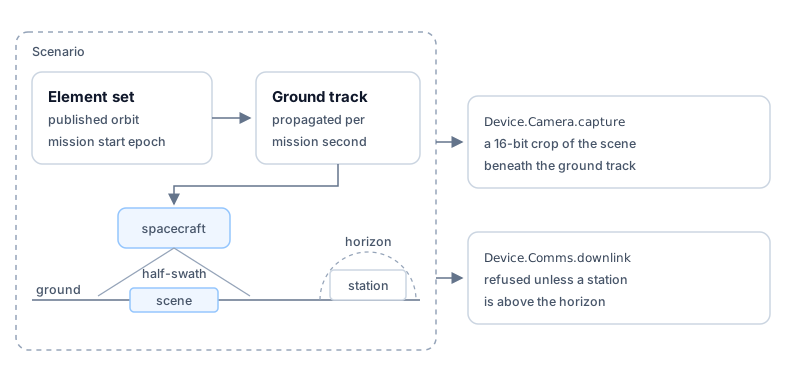
supplies one on your computer. It starts from a published two-line element set
(TLE), the orbit's parameters at one instant called
its epoch. It propagates that orbit, computing where the spacecraft is at any
later time of a simulated mission clock. It answers the payload's camera
with the scene beneath the ground track, the line of points directly below the
spacecraft. It accepts a downlink only while a ground station is in view.
The downlink limit is the part of flight a desk test usually skips. An app that can send everything never has to choose what to send, and that choice is why a satellite runs inference on board.
Prerequisites
space-sim, published as its own formula in the Parsimoni tap and installed the wayspaceis. The tap publishesspaceandspace-groundtoday and does not servespace-sim, so this prerequisite blocks the rest of the page.- The Space CLI, installed as the documentation home shows.
- A payload app that calls
Device.Camera.captureandDevice.Comms.downlinkfrom the OCaml library.
Inspect the world before you fly it
A scenario names an element set, a start epoch, ground stations, and a scene
directory. The park-fire scenario below ships with the simulator; write your
own to fly a different orbit. Every command takes the scenario as a path on
your computer, or as a name that resolves through a cache the way a space init template does.
show prints one situation report without starting the frame bus, the
256-byte message channel that space-sim run serves to your app. It gives the
spacecraft's position, whether it is sunlit, the battery charge, and the
temperature of the spacecraft bus, the platform that carries the payload and
supplies its power. It also gives the scene in view, the next pass over that
scene, and the next ground-station contact:
$ space-sim show scenarios/park-fire/scenario.json2026-07-16T18:50:53Zposition lat=40.271 lon=-122.777 alt=707.8km v=7.51km/spower sunlit charge=90% 293.1Kview parkfire_post_nir, 95km off the ground tracknext pass 2026-07-25T18:44:33Z parkfire_post_nircontact neustrelitz at 2026-07-16T20:01:04ZThe scene is in view 95 km to the side of the ground track. The scenario's
instrument.swath_km is 185, the width of the strip the Landsat 8 Operational
Land Imager sees. A scene counts as in view when it lies within half a swath,
92.5 km, of the track. --at moves the report to another mission time; use it to
choose a start epoch.
capture writes the picture the camera service would serve at a mission time,
as a GeoTIFF, so you can see what your app will receive. This acquisition holds
two bands, nir and swir, and the request names one. The output line names
the acquisition the pixels came from:
$ space-sim capture scenarios/park-fire/scenario.json --band nir --out burn.tifcapture(128x128 16-bit at 40.009875,-121.747319 len=32768 nodata=0 acq="parkfire_post")Serve the payload on the frame bus
The frame bus serves until you stop it, so run it in its own terminal:
space-sim run scenarios/park-fire/scenario.jsonDevice.Camera.capture now returns a 16-bit crop of the scene underneath.
Device.Comms.downlink is refused until a station in the scenario is above the
horizon. Off-nadir geometry is not modeled: a real off-nadir look foreshortens
and resamples the ground, and these pixels do not.
Account for the limits of the replay
The park-fire scenario replays Landsat 8 archive data under Landsat 8's
orbit. Three of its properties differ from your mission, and each one limits
what a passing run shows.
- The pixels are calibrated reflectance. The committed scenes are 30 m
Landsat Level-1 crops, and each band's
calibration.unitin the scenario readsreflectance. A flight instrument fills the payload's buffer with its own raw digital numbers and its own noise. Treat a model's accuracy in the simulator as an upper bound on its accuracy in flight. - The link rate is Landsat's. Both stations set
stations[].downlink_bytes_per_secondto48000000, the 384 Mbit/s of Landsat's X-band downlink. A small hosted payload may share a UHF downlink of a few kilobits per second with other payloads. Set the field to your radio's rate in your own scenario, and the downlink refusals then fire as they will in flight. - The revisit is a sixteen-day repeat cycle. Landsat 8 repeats its ground
track every sixteen days, and an overlapping neighbor track can bring a scene
back sooner, as the
next passline ofshowreports. A run tests which data your app decides to send. It does not measure how fast an alert reaches the ground.
Check the run in CI
Run the payload headless with a deadline, then read the runtime report:
space build . -t burn-index:cispace run burn-index:ci --headless --timeout 120space status --json > report.jsonjq -e '.result.state == "ok"' report.jsonresult.state is ok when no workload failed, and failed, with the reason,
otherwise. A workload that downlinks nothing also exits cleanly, so assert on
what the app produced as well. downlink.state is available once the app has
produced something to send, and idle when it has not; asserting on it fails
the build when the app captured nothing and sent nothing:
jq -e '.downlink.state == "available"' report.jsonA run whose contact window never opens tests the wrong thing. Use show to
choose a start epoch that puts both a scene and a station inside the window you
give --timeout.