Integration models
Some payload computers arrive with nothing on them, and you decide what boots. Others arrive with a vendor's Linux that you cannot replace, because the vendor qualified it, supports it, or owns the boot path. SpaceOS runs on both kinds, with the same control plane admitting and supervising workloads, and differs in how much of the machine that control plane owns. There are two integration models: the system image, where SpaceOS is the operating system, and the daemon install, where SpaceOS runs as a set of services on the vendor's.
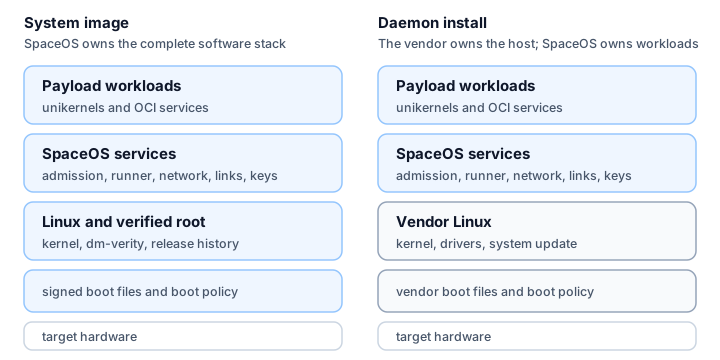
Inspect the integration model
A target's profile fixes its model. Connect a target and read its record back:
$ space target connect cm5-demo --profile cm5-dev \> --endpoint ipn:7.1 --cla-address cm5-demo.local:4556 --always-reachable✓ cm5-demo registered: cm5-dev, always reachable$ space target show cm5-demoname : cm5-demoprofile : cm5-dev@sha256:9a763f58b419708a33ba38e540d0d3b3ca9fba99846863daed4636c97bf55145board : raspberrypi-cm5signing-key : /tmp/space-docs/config/keys/target-cm5-demo-boot.pemdtb : (firmware stock)kernel : (image default)ack-key : /tmp/space-docs/config/keys/target-cm5-demo-ack.pemrecipient-key: (none: whole-bundle delivery only)runtime-provenance: (none: releases measured against this ground's own ceiling)approves : you, aloneendpoint : ipn:7.1cla-address : cm5-demo.local:4556contact : always (a target on a network)rate : 1e+06 B/s (default)ground : this machine's local groundpublisher (none: a deploy pins this machine's signing identity once a build's evidence verifies under it)verdict no verdict recorded: this machine keeps no deploy store yet (/tmp/space-docs/config/deploys.sqlite), where the ground `space up` runs would record what cm5-demo announcesThe provider was not asked: no target file for cm5-demo is recorded on this machine, and this directory holds no targets/cm5-demo.yaml. Name the directory that holds the file, `space target show PATH`, or record it once with `space target connect PATH`The record lists the target's signing custody: which keys the target record
holds and where their files are. signing-key is the RSA-2048 key that signs
the board's secure-boot image. ack-key is the Ed25519 key the node signs its
deploy acknowledgements with; the ground pins its public half.
recipient-key is the target's ML-KEM-768 public key, minted on the target by
space-deploy keygen. Once it is enrolled, the ground encrypts each release to
that target alone; without it, the ground sends the whole bundle unencrypted
and relies on its signatures.
The record names no boot state key, the 32-byte device key whose HMAC-SHA-256 authenticates the node's boot record, which says which release the node boots. The target profile is the one place that says where the node reads it, and an image build refuses a profile whose source it cannot spell. The node refuses to bring up a service or stage a release without that key, and Anti-rollback floor says where each target profile takes it from.
rate is the link rate the target assumes, in bytes per second. space deploy
uses it to bound how long it waits for a release of B bytes to activate:
⌈300 + B / rate⌉ seconds, where 300 seconds covers staging, the trial reboot,
and the healthy acknowledgement. A 40 MB release at the default 10⁶ B/s gets
⌈300 + 40⌉ = 340 seconds.
The last line is not an error. A target made by space target apply also has
cloud-provider resources, described in targets/NAME.yaml, and
space target show reads that file to ask the provider for their state. Run
outside the directory that holds the file, as here, the command shows the local
record only.
A system-image profile names the kernel, device tree, firmware, boot layout,
and secure-boot policy. A daemon-install profile leaves those to the vendor
image, and names the install prefix and service manager instead. When the
target's manifest declares provision: resources, space target show follows
the record with the provider state and any outstanding plan.
Check the resolved release before a deploy:
space deploy payload:release --target <target> --planThe plan says whether space deploy assembles a boot image for the target or
sends a workload release to the SpaceOS services already installed on it.
System image
SpaceOS is the operating system on a system-image target.
space build emits a target-independent composition, and space run and
space deploy assemble it into a bootable image for one target, taking the
board kernel, device tree, and firmware from the target profile.
SpaceOS then owns the boot path end to end: the signed boot object, the read-only root protected by dm-verity, the content store holding the release history, and every service above them. Three profiles take the system image:
- Development VM (
macos-vmm). The node is a VM on your Mac, booted through Apple's Virtualization framework. - Raspberry Pi CM5 (
cm5-dev,cm5). The image is assembled as a flashablecm5.imgbehind the board's native secure boot. - Provider instance (
scaleway). The image is imported as a UEFI disk and boots a cloud instance from a block volume.
Choose the system image whenever you control the machine. It gives you verified boot, measured launch, health-gated system updates, and an anti-rollback floor for the whole system.
Daemon install
A daemon install runs SpaceOS on a Linux the platform vendor owns, built and shipped as that board's board support package. Yocto is the toolkit most vendors use to build such a custom embedded Linux distribution. PetaLinux (AMD) and LSDK (NXP's Layerscape SDK) are vendor Linux distributions built that way, for the AMD Versal VCK190 evaluation board and the NXP LX2160A 16-core Arm processor respectively. The host keeps the boot path, the kernel, and the device drivers. SpaceOS installs its control plane as a signed bundle of services and starts them through the host's service manager.
The hosted-linux profile covers an operator-owned arm64 Linux with cgroup v2
and systemd. space target bundle signs the daemon set, and on the host:
space target install --bundle <bundle-dir> --issuer <publisher-key.pem>space target verify --issuer <publisher-key.pem>space target install verifies the bundle against the pinned issuer key
before it writes anything, then installs it under the profile's prefix,
/opt/space, with one systemd unit per daemon.
space target update replaces the daemon set and reverts if it does not come
up, and space target uninstall removes it.
Every board that keeps its vendor Linux takes this model: the Raspberry Pi 4B, VCK190, LX2160A, Jetson TX2i, Kalray Coolidge V1, and Innoflight CFC-400 each run SpaceOS on top of the vendor's image, from a target profile of their own [roadmap]. Supported targets records where each board stands today. Each node joins a ground and the same control plane, where it accepts the same signed workloads as any other node.
The daemon set launches workloads with the isolation the host kernel offers:
runc containers for Linux services, and for unikernels the Solo5 hvt
tender where /dev/kvm exists or the
spt seccomp tender where it does
not [roadmap]. hosted-linux declares runc alone today. A host whose init
is BusyBox with SysV scripts takes the same signed bundle, with an rc.d script
per daemon in place of a systemd unit, through the same install, update, and
uninstall commands [roadmap].
A daemon install keeps workload admission and update security. Admission is the same signed, offline check that refuses to launch when anything fails to verify. Workload updates roll out blue/green with health-gated promotion and rollback, and the SpaceOS services update themselves through a signed bundle and keep the previous one.
SpaceOS does not verify the vendor's boot in this model, and there is no
whole-system release to roll back. Isolation reaches as far as the vendor
kernel allows: a backend that needs /dev/kvm works only where the vendor
kernel provides it.
Ownership
| SpaceOS owns | System image | Daemon install |
|---|---|---|
| Boot path and bootloader | Yes | No, the host does |
| Host kernel | Yes | No, the host does |
| Verified boot (dm-verity, signed boot object) | Yes | No |
| Whole-system releases (trial, confirm, rollback) | Yes | No |
| Workload admission (signed, offline, refuses on any failure) | Yes | Yes |
| Workload updates (signed, blue/green, health-gated) | Yes | Yes |
| Its own services' updates (signed, previous kept) | Yes | Yes |
| Isolation backends | As the profile declares | As the vendor kernel allows |
| Partition and service lifecycle | Yes | Yes |
| Logs and metrics collection | Yes | Yes |
| Ground-link stack (CFDP, BPv7, BPSec, SDLS) | Yes | Shared with the host |
Both models run the same signed compositions. Moving a workload from a daemon-install bench to a system-image target changes the target, and leaves the application unchanged.
Provision and connect a target
Cloud instances and satellites are the same kind of target. Each has an exact profile, a node identity, and a transport. Bring-up differs between them because different parties own the hardware boundary.
| Stage | Cloud instance | Physical satellite or edge computer |
|---|---|---|
| Provision | Create the boot image, instance, data volume, address, and firewall through the provider API. | Follow the board's bring-up procedure to flash a system image or install the daemon set. |
| Connect | Bind the running node to its profile, identity, signing custody, and always-reachable IP transport. | Bind the node to its profile, identity, signing custody, DTN endpoint, and convergence-layer route, with an orbit-derived or fixed contact window. |
| Operate | Deliver signed releases with space deploy. | Deliver signed releases with space deploy. |
space target apply creates the provider
resources with the provider's credentials, then records the platform identity,
signing custody, and transport. It acts as soon as you run it, and it may start
billable cloud resources; --plan rehearses it and touches nothing.
space target connect does only the second
half, for a machine that already exists.
Once connected, a node in a data center and a node in orbit take the same deployment path. Only the profile and the transport differ.
Ground DTN node
The ground keeps a durable bundle store and routes to connected targets. The target record names its ground, its spacecraft endpoint, and its contact plan. Its convergence-layer address is the host and port where the ground opens a TCP convergence-layer session (TCPCL, RFC 9174) to hand bundles over. It names either a direct bench listener or the station gateway that reaches the spacecraft. A station gateway is the program at a ground station that receives bundles from the ground over TCPCL and hands them to the station's modem for the radio link, and the reverse on the way down.
This machine runs a local ground for bench and direct-contact work.
space target connect NAME --ground https://run.space records a hosted ground
on the target instead, and a station gateway next to the modem joins that
ground to the radio link. space login URL stores the credential for a ground
under its origin.
Wire formats
The protocols do not change with the integration model:
- Ground-bound traffic is CCSDS. SDLS authenticates each data link, and CFDP Class 2 over BPv7 with BPSec carries files end to end across contact windows. Class 2 is the acknowledged mode of CFDP (CCSDS 727.0-B-5): the receiver reports missing byte ranges with NAKs and confirms completion with a Finished PDU, so the sender retransmits until the whole file has arrived. The host's flight software may own the radio in a daemon install, and SpaceOS then hands the framed stream over at the host boundary.
- On-board application traffic is IP. Services reach each other on the IP bridges their signed release grants.
- Telemetry and command frames use the frame bus, the CCSDS-native path between partitions, the flight domain, and the ground link.
- The local control plane is a Unix socket. The CLI commands the runner over a local socket that checks the peer's credentials. A remote command needs a signed command envelope, and network access alone grants no authority. The envelope is a COSE signature over the command, a capability token naming who may issue it and until when, and freshness fields: a command id, the issuer's sequence number, the receiver it is for, and the interval in which it may run. The node keeps the highest sequence it has executed for each issuer and signing key, so a replayed or expired command is refused.
Networking and data planes explains each one.
Choosing a model
| If the target is... | Model |
|---|---|
| Your development machine | System image, the development VM |
| A Raspberry Pi CM5 | System image |
| A cloud instance | System image |
| An operator-owned Linux host | Daemon install |
| Any other board in Supported targets, where the vendor Linux stays | Daemon install [roadmap] |
| A flight computer with a fixed vendor BSP | Daemon install |
A fleet can mix models. A CM5 bench node on the system image and a vendor flight computer on a daemon install join the same ground and receive the same releases.