Bring up a Jetson TX2i
The NVIDIA Jetson TX2i is the industrial-grade variant of the Tegra X2 module, a hex-core ARM SoC (dual NVIDIA Denver + quad Cortex-A57) paired with a 256-core Pascal GPU. It is intended as a daemon install in the target matrix, for AI inference workloads that need on-board GPU acceleration.
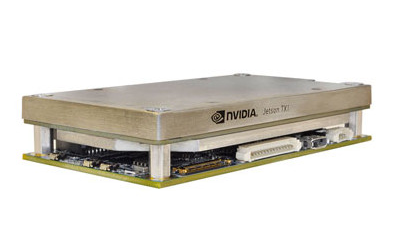
The Jetson developer carrier uses the standard firmware-and-root-filesystem flow. Custom carrier boards (Connect Tech, Auvidea, and similar) use the same flow with vendor-specific device-tree overlays.
Use the JetPack / L4T line that still supports TX2i in your vendor board support package. TX2i deployments usually stay on JetPack 4.x, because newer JetPack lines target later Jetson modules.
Hardware topology
- 2× NVIDIA Denver 2 cores + 4× ARM Cortex-A57.
- 256-core Pascal GPU with CUDA support and TensorRT runtime.
- 8 GB LPDDR4 memory, 32 GB eMMC, MIPI CSI camera lanes, multiple PCIe Gen 2 lanes.
- Industrial-temperature variant: −40 °C to +85 °C operating range, with no soldered-on parts that block flight qualification.
Flash a Linux image
NVIDIA ships JetPack for Jetson modules, an SDK Manager that bundles the board support package, Linux for Tegra (L4T), CUDA, cuDNN, and TensorRT.
Start from the vendor L4T image. A SpaceOS daemon install would need KVM turned on, the contiguous memory area sized for the workload, and a device access policy for the GPU nodes. SpaceOS ships no target overlay that does this, so those are kernel-configuration changes you make yourself.
Flash and configure the module:
- Install NVIDIA SDK Manager on an x86_64 Linux host.
- Place the TX2i module in recovery mode (jumper or button sequence; consult the carrier-board documentation).
- Run SDK Manager and flash the OS image and components.
Boot and verify
After flashing, boot the module and log in with the credentials you created during the L4T install.
ls /dev/kvm # KVM enablednvidia-smi # GPU visiblecat /etc/nv_tegra_release # L4T versionThe intended arrangement gives container services (isolation: runc) the
Pascal GPU through CUDA once the target grants the device nodes, and gives
unikernel services the
hardware acceleration
delegation path. Both are design. The accelerator schema models a Gpu kind
and carries signed grants, and no shipped profile declares a GPU, so nothing
selects one today.
Selection criteria
Choose the TX2i when:
- Your workload is GPU-bound, such as object detection or segmentation.
- You can accept the +85 °C upper limit and the Pascal-era performance envelope.
- You need a self-contained module, where the carrier board is the only mission-specific hardware.
The VCK190 gives higher inference throughput on FPGA fabric. The Raspberry Pi 4B suits lower-power workloads that need no acceleration. All three are in development; the Raspberry Pi CM5 is the supported board to prove a workload on today.