Boot, updates, and rollback
A payload computer in orbit has no one standing next to it. A release that fails to boot, or boots and then hangs, has to bring the node back on its own, before the next contact window. SpaceOS therefore verifies every release before it runs, keeps the last release that worked, and falls back to it without a command from the ground. Workloads and the system underneath them update through two separate mechanisms.
Deploy and watch a release
Inspect the complete release before sending it:
space deploy payload:release --target sat-42 --planThe plan names the composition digest, target profile, boot files, signing identities, security versions, and expected image digest. A security version (SVN) is the release's rollback index, an integer the node compares against its stored floor to refuse older releases; Anti-rollback floor explains it. Deploy the release, then read its record back by target and version:
space deploy payload:release --target sat-42space show sat-42 v1Every deploy to a target is that target's next version. space show prints the
record's phases from published to activated, and the node signs the
installed and activated acknowledgements.
Boot verification
Boot checks authority and content. Signature verification identifies who authorized the content. Digest verification checks that the authorized bytes arrived unchanged. On the Raspberry Pi CM5 reference target the chain is:
| Stage | Verification |
|---|---|
| Board ROM and firmware | Native board secure boot verifies the customer-signed boot image. |
| Boot release manifest | An Ed25519 signature binds the kernel, runner, applications, and rollback version together. |
| Root activation | dm-verity verifies every filesystem block on read, against a root hash pinned on the signed kernel command line. |
space-init handoff | The measured launch plan is checked against what is actually on disk, and boot stops on any mismatch. |
| Workload admission | TUF authorizes signed workload digests, with no network needed. |
dm-verity is the Linux device-mapper target that checks a read-only file system
block by block. On cm5 the build cuts the root file system into 4096-byte
blocks and hashes each with SHA-256. It packs those 32-byte hashes 128 to a
4096-byte hash block, hashes the hash blocks the same way, and repeats until one
root hash remains. The root hash goes on the kernel command line as
verity.roothash=, and the command line sits inside the signed boot.img, so
the board signature covers it. When a process reads a block, the kernel hashes
it and checks the hashes on its path up to the root. A mismatch returns an I/O
error, and the tampered byte never reaches the process.
For a root file system of n blocks the tree has L = ⌈log₁₂₈ n⌉ levels, so a cold read checks L + 1 hashes, and the hash blocks take about 32n bytes. A 1 GiB root has n = 2¹⁸ blocks, so L = ⌈18 / 7⌉ = 3. A cold read of one block checks four hashes, and the hash tree takes about 8 MiB beside the 1 GiB it protects. The kernel caches verified hash blocks, so later reads under the same branch check one hash.
The TUF row works without a network because the node carries its trust root. TUF (The Update Framework) splits signing into roles: root lists the keys of every role, timestamp names the current snapshot, snapshot names the current version of each targets file, and targets lists each workload's name, length, and SHA-256 digest. The node checks this chain from the root keys pinned in its signed initramfs, and it launches a workload only when the bytes it holds have the length and digest the targets role lists.
Each layer verifies its own object, and a pass at one layer does not satisfy another. The native board signature authorizes the firmware boot stage; it says nothing about which workload may launch. On the development VM the chain starts at the host hypervisor. Its root of trust is the development signing identity pinned on first use. The dm-verity and TUF layers are the same.
Measured boot evidence
The signature and content checks above rest on keys and digests, so they hold
on every target and need no security chip. Measured boot needs one. A target
that carries a TPM measures the release it booted
into platform configuration register 11. A platform configuration register
(PCR) is a TPM register that software cannot set, only extend: extending PCR
i with a value v replaces its content c with SHA-256(c ‖ v). space-init
extends PCR 11 of the SHA-256 bank once with the 32-byte release identity.
The register starts at 32 zero bytes after a reset, so after boot it holds
SHA-256(0³² ‖ release_id). A target without a TPM says so on the console at
boot, and its chain is the signature and verity layers alone.
The TCG PC Client profile reserves register 11 for the operating system, so the measurement leaves the firmware and bootloader registers alone and the system is measuring itself. The booted system makes the measurement, so the value is only as trustworthy as that system: it records which release the system says it is. The boot prints the release it measured, and anyone who holds that release can recompute the value register 11 must then hold. The measurement does not chain to firmware, so it does not separate a node that booted the measured release from one whose firmware was replaced and then measured the same value into register 11.
Read the target profile to know which you have. It names the device classes the board carries and the security claims the profile makes, so the strength of a target's boot chain is a fact you look up. Attestation over measured-boot evidence is planned for the next release [v1.1].
Update mechanisms
SpaceOS uses different mechanisms for workloads and for the boot-critical system:
| Mechanism | Changes | Activation |
|---|---|---|
| Workload blue/green | Independently deployable services and their policy | Old and new run side by side; promote after health probes |
| System release | Kernel, initial RAM filesystem, control plane, verity root | Append to the content store; trial reboot; confirm after boot health |
A workload update leaves the node running, while a system release enters the content store and starts through a trial reboot.
The two mechanisms also map onto the two integration models. Blue/green workload rollout and signed admission apply everywhere, including daemon installs on a vendor Linux. So does the runtime's own signed self-update. System releases and the anti-rollback floor apply to system-image targets, where SpaceOS owns the boot path.
Workload blue/green rollout
A workload generation rolls out without a reboot:
- Preflight. SpaceOS checks the candidate image digest, signature, permitted resources, security version, and available memory. If the old and new copies cannot run together, the update stops and the old copy keeps running.
- Launch green. Candidates start in dependency order while the old (blue) instances remain authoritative.
- Probe. The runner probes each new service in turn from outside the
guest, running the TCP or HTTP check the service declares. A service is healthy
when its check passes within
retriesattempts after thestart_periodgrace. - Promote. When every new service is healthy, the node promotes the new generation. The first unhealthy service stops the rollout instead. The node persists the commit, and the blue instances stop after that.
A candidate that fails before promotion is stopped and blue stays authoritative. A multi-service generation reports either a committed result or a rolled-back result.
Promotion becomes an atomic route flip, with a health acknowledgement signed over the workload's own probes, in the next release [v1.1].
System release rollout
System images live in a content store, one partition that holds any number of dm-verity filesystem images indexed by their root hash. There are no fixed A/B partitions. An update appends the new image and shares unchanged content with the old. A small, tamper-evident boot record then holds three pointers: the confirmed release, the release on trial, and a last known good to fall back to. The boot record selects releases by content identity. Retention policy and free space set how many rollback targets stay available.
The boot record is a fixed 179-byte structure, written in mirrored copies on a raw partition. It holds the three release identities (32-byte SHA-256 digests) with their security versions, the trial attempts left, the anti-rollback floor, and a write sequence number. The newest copy that checks wins, so a write torn by power loss leaves the previous copy in force. An HMAC-SHA-256 over the record, under the device's 32-byte boot state key, makes it tamper-evident: a record edited without the key fails the MAC check at boot. A CRC-32C over the whole record catches a corrupted copy before the MAC is computed.
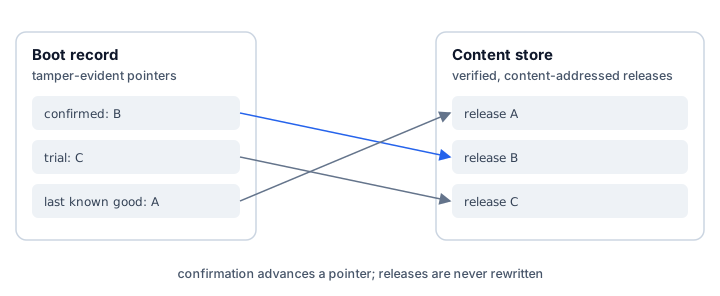
A boot-critical change is staged into the store, verified, and read back. It is then armed as the trial release, with a power-loss-safe record, before the node reboots. The trial boot must pass native secure boot, the release manifest, dm-verity activation, state recovery, and the configured probes. Only then does the confirmed pointer move. A failure, or exhausted boot attempts, falls back automatically to the last healthy release.
A trial release gets three boot attempts. Each attempt on a board with a
watchdog device is bounded by the
payload watchdog, which
resets a node that stops answering within 60 seconds of the last refresh, so an
attempt that hangs cannot hold the trial open. Call t_boot the time from reset
to the moment space-init arms the watchdog, and W the watchdog timeout. An
attempt that hangs costs at most t_boot + W before the reset, and three failed
attempts are followed by one boot of the last healthy release. The worst case
from activation to running that release again is therefore
3 (t_boot + W) + t_boot. With W = 60 s and a board that reaches space-init in
30 s, that is 3 × 90 + 30 = 300 seconds, five minutes. Put your board's own
boot time in the formula, and size your contact window against the result
before you activate a release you cannot supervise.
Every phase has a durable recovery rule for power loss. The transfer resumes after a loss during receive. The confirmed release remains untouched if power fails during staging. Confirmation retries idempotently after a loss. The confirmed release stays bootable and verified throughout the update.
Anti-rollback floor
The security version number (SVN) is separate from the release generation. It
changes only when policy bars older security states, so a routine rebuild
leaves it alone. The operator publishes it with space build --rollback-index N,
and a --release build requires 1 or more: a release left at the development
index would never outrank its predecessor, and that is refused where you can
see it.
After a system release confirms, the node ratchets its floor. Any release whose SVN is below the floor is invalid, even with an otherwise valid older signature. Workloads updated on their own carry per-component SVNs in an authenticated rollback map. The rollback map is a table from each workload to the highest SVN the node has admitted for it, and its root is bound to the node's committed state under the boot state key. Updating one workload changes only its entry and the map root, so each ratchet applies only to the workload that was updated, and a replayed older map cannot lower any entry.
The floor is anchored to the strongest monotonic state its target has, and each target profile publishes which that is:
| Anchor | Where the floor lives | Profile claim |
|---|---|---|
| Software | A MAC-authenticated record on the node's own writable storage, sealed under a boot state key whose source the target profile names: the SoC's one-time-programmable (OTP) memory on cm5-dev, the provider's virtual machine monitor on scaleway, the host program that runs the development VM on macos-vmm, and a file under the host's own access control on hosted-linux. | software-rollback |
| Hardware | A monotonic counter in a discrete TPM 2.0 NV index, which only ever counts up and survives a wiped disk. | tpm2-rollback |
space target apply mints the boot state key for a node whose boot disk it
assembles, prints the path it generated, and binds the key into the disk, and a
node SpaceOS boots takes the source from its signed kernel command line. A
daemon install floors its workloads only: it has no boot disk of ours and no
whole-system release to floor, which is the boundary the
integration models draw.
On cm5-dev the state key sits in the OTP rows the SoC sets aside for a
device private key (source: soc-otp in the profile). Those rows are separate
from the rows that hold the hash of the board's boot-signing key. cm5-dev
leaves the boot-signing rows unwritten, so its secure-boot enrollment stays
reversible; only the locked cm5 profile writes them.
The node refuses a key file it cannot account for. The path has to be a regular
file, owned by the user that wrote it, at mode 0600. The mode is compared for
equality over every bit, so a file granting group or other access is refused.
The path is checked without following a symlink, so a symlink left in its place
is not the floor. A file failing any of those is refused and never repaired.
A key file that was ever readable by another user may already have been
copied, so a chmod that tightens the mode afterwards cannot make the key
secret again. A chown would adopt a file this node did not write. A node with
no key configured brings up no service and prints no boot state key configured; refusing service bring-up.
Of the five target profiles shipped today, cm5 claims tpm2-rollback and the
other four claim software-rollback. The claim sits on the profile because the
same board carries either floor: cm5-dev and cm5 both name the Raspberry Pi
CM5, and only cm5 requires the discrete TPM the counter lives in. An attacker
who can rewrite the software floor's own storage and holds its key can move that
floor. That attacker cannot move a TPM counter.
Rollback to an earlier release stays possible within that floor.
space deploy rollback --target TARGET delivers the content of the release the
target ran before as a fresh deploy, which becomes the target's next version and
goes through the same approve, uplink, and activate pipeline. The node admits
it only while its SVN still satisfies the confirmed floor. Where the ground
cannot build that release, the command refuses before publishing anything and
names the version the target confirmed.
space deploy rollback --target sat-42space show sat-42 v3space deploy rollback reverts what the uplink delivered. A workload generation
that fails its probes during a blue/green rollout is rolled back by the runner
on the node, with no command at all.
Deployment states
A deploy is a durable record that survives restarts, missed contacts, and redelivery. Its phases, in order, are:
| Phase | Meaning |
|---|---|
published | The release is signed and recorded, and waits for approval. |
approved | The target's approvers signed decisions that admitted it to the uplink queue, as Approve a deploy shows. |
queued | It waits for the target's next contact, and the record says why. |
held | An operator took it off the queue with space deploy hold; space deploy release puts it back. |
uplinking | It is crossing the link. The record carries the share delivered so far. |
installed | The node wrote and verified it, and signed a staged acknowledgement. |
activating | The node's runner is bringing it up. |
activated | The node signed a healthy acknowledgement. |
rejected ends a deploy by an operator's decision before activation, and
failed ends it on an error the pipeline records. Both are terminal.
Only the node's signed acknowledgements move a deploy to installed and to
activated. A staged acknowledgement says the bytes were written, verified,
and read back, before any boot. A healthy acknowledgement says the probes
passed and the floor ratcheted. Evidence from the ground side records delivery
and nothing more.
space deploy ls lists the deploy records this machine holds, and space show TARGET VERSION prints one record with the transfer stage by stage. Once a
release is activated, space status reports the services it runs with their
runtime state: running, backoff, exited, or failed.